Out of the Construction Crisis
ONE DATA SYSTEM – Detailed Data
Owners and builders will experience measurable process and value improvement through Building CATALYST-based integration, automation, and Win-Win Contracting. This is possible because of an objective knowledge system driven by a network of interrelated components working together to accomplish the purpose of the building – or the owners business case.
This systems approach starts with network of critical (Pareto) data – the fewest data entities that drive the greatest objective knowledge. It eliminates the first layers of waste associated with the construction support services.
The next step is to move from critical (Uniformat Level 2.5) to detailed data starting with Uniformat Level 3.5. This expands the technical CATALYST-based platform from Planning/Budgeting/Estimating/Bidding to the detailed space programming, design, and documentation. Building CATALYST and Autodesk Revit and are the core technologies that all other detailed technologies and processes submit to. For a more advanced technology platform, the space programming and owner equipment planning and management is handled by dRofus Data Management – as shown in Figure 1.
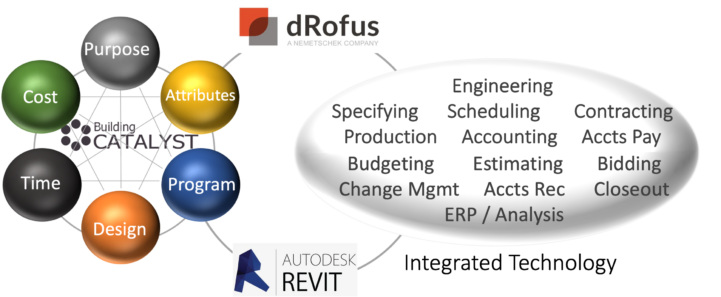
Figure 1 – One Data System – Detailed Data Platform
This technology integration has been successfully piloted on a patient floor fit out for Mary Free Bed Rehabilitation Hospital in 2022. Let’s take a deeper dive into this advanced application of the systems approach.
Mary Free Bed Rehabilitation Hospital Fit Out Trial
This scope of this pilot project included the fit out of 24 patient rooms in a previously shelled main campus tower, shown here in Figure 2.
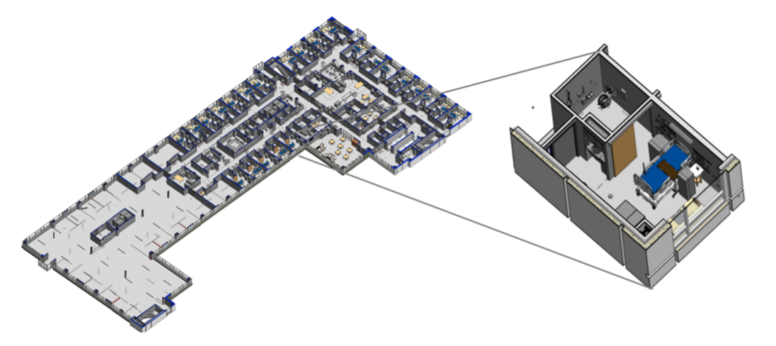
Figure 2 – Mary Free Bed 6th Floor Fit Out Plan
Starting in the planning stages, Building Catalyst provided program and budget analysis.
This pilot showed how we can get away from manual, one-off, Excel spreadsheets in the detailed programming, equipment planning, and design. dRofus Data Management and Autodesk Revit provide databased technologies that can be networked with, and submit to, the CATALYST ONE DATA SYSTEM.
The Systems Platform in place, even the most customized “whole buildings” can be made up of mostly standardized elements, assemblies, kits-of-parts, etc. Let’s take a dRofus tour to show how projects can be “prepared in advance” by pre-programming, pre-designing, pre-specifying – and, ultimately pre-pricing, pre-purchasing, and pre-approving.
dRofus Program – Room Data
Building CATALYST provides the Space Program Structure based on functional metrics (like patient beds, and rehab treatment spaces in this case). The functional or departmental gross area can be calculated from these functions. The program groups include Core and Common, Functional (only one department in this case) and Supporting (Building Services (back of house), etc.) All these spaces are data-driven with many attributes driving the outcomes.
dRofus Data Management provides a comprehensive database of room templates, finishes, and services standards. It also includes product selections, specifications, etc.
Figure 3 shows how the CATALYST critical (Pareto) data entities are expanded into the dRofus details – in-patient rooms in this case.
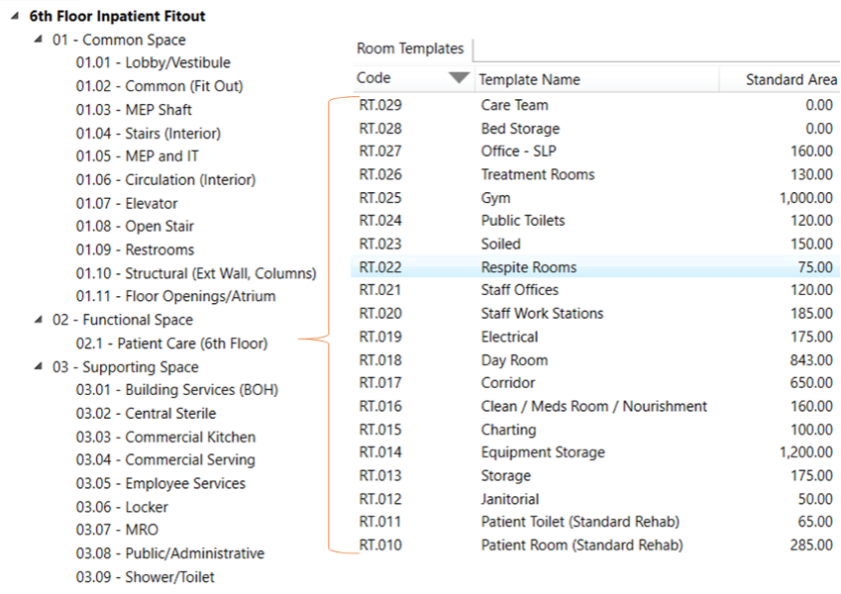
Figure 3 – Catalyst Space Standards to dRofus Room Templates
The Common and Supporting Space groups are standardized – as applicable to each project.
Taking the Patient Room for example, we have just one template, from which 24 discrete rooms originate. Each discrete room can accept all default data or can be customized in small or large part. Figures 4 and 5 shows excerpts of the dRofus Patient Room data and information.
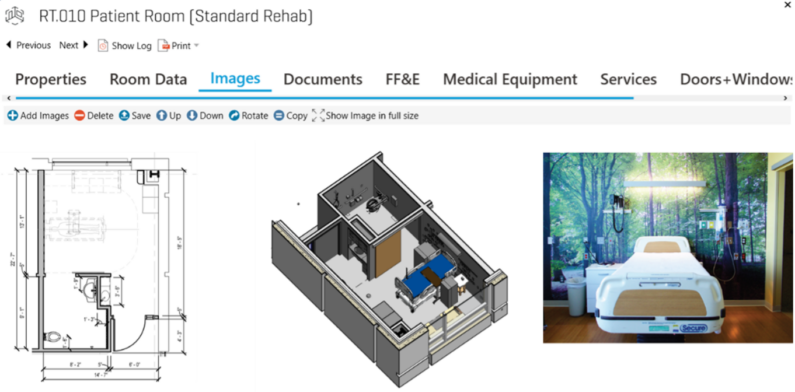
Figure 4 – Patient Room Template Images
All or most of the room types should be templated and pre-populated with their items: finishes (Figure 5), doors, MEP fixtures and devices, fixed equipment, owner-furnished FF&E, products, etc.
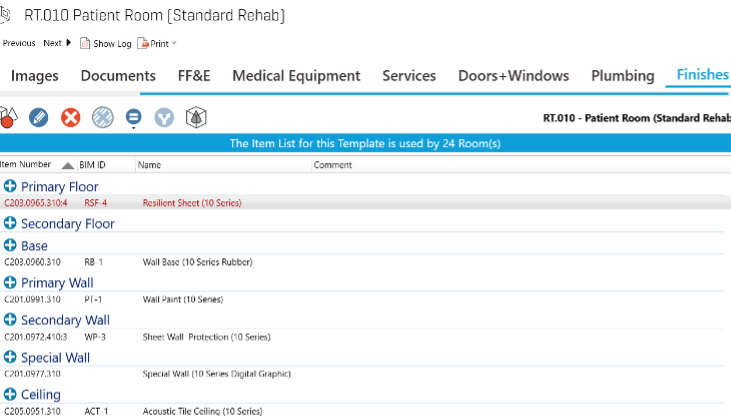
Figure 5 – Patient Room Template Finishes
It’s important, in developing standards, to adhere as close as possible and practical to published industry standards. For program spaces, FGI and CSI OmniClass Coding Structures provide a standard from which to follow. dRofus also includes an OmniClass Table 13 field at the room level.
dRofus Room Items
The building and equipment components/elements associated with rooms are most effectively defined and managed with dRofus. The components/elements not associated with rooms (site, structure, enclosure, stairs, elevators, partitions, MEP infrastructure) currently have no similar data solution from which to “Build the Plant”. Autodesk Revit could provide some of the needs, but not ideally.
Figure 6 illustrates this with the dRofus data structure from Uniformat Level 1 (i.e., C – Interiors) to Level 2 (i.e., 20 – Interior Finishes) to Level 2.5 (i.e., 3 – Floors) to Level 3.5 (i.e., 0968.310 – Carpet Tile (10 Series)). In the early planning or pre-programming (Stage 1) Building CATALYST models the program, design parameters and cost to Uniformat level 2.5. Once the space program is developed in dRofus, the opportunity exists to perform cost modeling at Uniformat level 3.5. It’s just a matter of having the content libraries properly populated with reliable data.
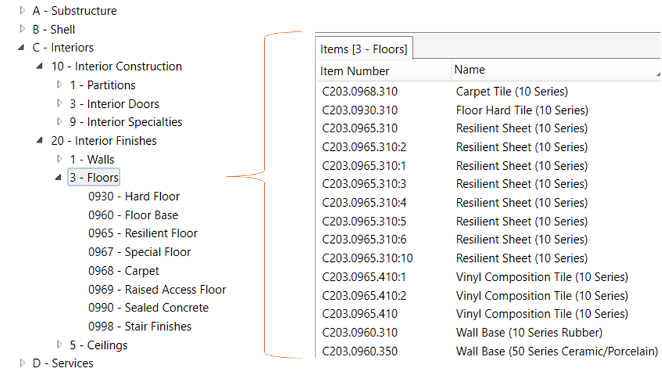
Figure 6 – dRofus Items to Uniformat Level 3.5 (Floor Finishes)
dRofus Product Manufacturers and Models
Moving construction from its one-off, experience to one where most of a given project assemblies and componentry are prepared in advance – or pre-designed, pre-spec’d, pre-priced, and pre-approved (aka Kit-of-Parts) is made possible with dRofus. It’s a matter of developing enough scale to make it worthwhile. With dRofus, a wide variety of manufacturers and models can be procured via consortium or GPO – ready for product and color selection. Figure 7 shows excerpts of the dRofus floor finish items for this pilot project.
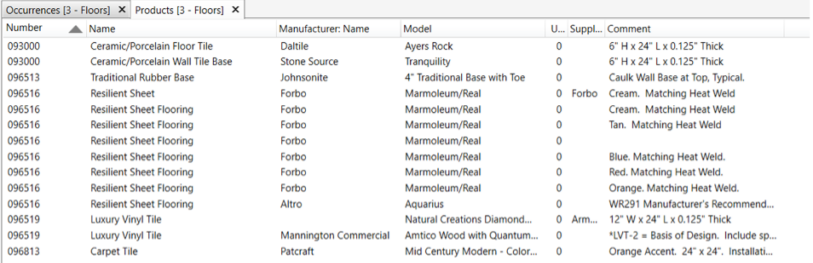
Figure 7 – dRofus Floor Finish Items with Associated Products
With the dRofus data and information structure, the opportunity exists to eliminate decades-old and archaic technical specification process, scope of work development, bills-of-materials, submittal processing, etc. With the technical capabilities in place, the roadmap for moving construction to the full Systems Approach becomes more apparent and ready.
Revit Finishes vs. Family/Types
Autodesk Revit provides capabilities to standardize, integrate and automate data and technology in both directions:
· Upstream – planning via Catalyst and programming via dRofus,
· Downstream – estimating, scheduling, procurement, construction data resources.
There are limitations that need to be addressed by Autodesk and dRofus prior to a full roll out as described in the pilot report.
Revit room finish elements are set up as single dimension entities. Non-room finish elements are set up as two-dimensional entities: Families + Types. This presents a complication requiring work arounds. Strategically, the development of the Systems Approach creates a higher order (or parent) data entity referred to as “Clans”. Clans can be set up as new data fields or use the Revit “Assembly” field. Revit room finish elements and non-room finish Families can map to and roll up into Clans. Clans are coded to the Catalyst Uniformat level 3.5. This is important for use by AE firms to retain their own standard Revit Families, Types and Finish items. Ultimately, however, in the ideal state, Clans and Families will be merged into one as part of a super-streamlined process flow and data maintenance initiative.
Figure 8 illustrates this regarding the wall schedule (interior partitions). The Assembly Code (UF level 3.5) and Description are globally defined and established in a library or catalog from which all Systems Approach users may access.

Figure 8 – Revit Wall Schedule Example
Cost Data Management – Estimating to Actual
With the owner’s business case, the space program, the constraining attributes, the design elements, and the product selections all integrated into a system – the final component to be added is cost. Building Catalyst automatically models the cost at Uniformat Level 2.5 (i.e., C101 Partitions). As noted above, this results in a more accurate prediction of cost at the total project level, but there remains high variation within each of the line items. This pilot addressed the next level of detail in cost estimating and actual cost – starting with the trade contractor bidding process. A more robust cost certainty and waste reduction effort becomes possible when taking the design and cost elements to Uniformat Level 3.5 (i.e., C101.0921.340 – Int Wall: 3 5/8” Mtl Stud to Deck (1 Hr, STC<50).
In moving from cost modeling (CATALYST) to estimating requires a more sophisticated platform than most builders are used to (like WinEst or Sage). Beck’s Destini Estimator and RIB’s iTwoCostX estimating platforms are better options because of their Revit plug-in to extract both 2D and 3D quantities and plug-in to the cost estimate. Without the Clan (UF L 3.5) structure, this process still requires significant manual effort.
Revit’s finishes structure for quantities poses an exchange issue that Destini and iTwoCostX should be able to address with Model Maps for floor, wall, and ceiling finishes, respectively. There are also significant issues relating to static unit cost libraries, as mentioned above. CATALYST provides dynamic, attribute-driven unit cost at UF L 2.5 – which is needed at L 3.5 as well. Finally, it’s important for detailed estimates to be filtered and reported by trade contractor or supplier. This is important for cost management, but also for collecting actual cost data.
In a parallel effort – on this pilot project a Level 3.5 Estimating template in MS Excel was created to addresses these potential issues with iTwoCostX. This template process provides an intermediate step to bi-directional data exchange. Future API development will be needed to effectives eliminate 3rd party applications.
Eventually, detailed (Level 4/5 Revit Family/Type) quantities and bills-of-materials from dRofus and/or Revit will be generated. This achievement will provide a breakthrough in transforming the building process – dramatically reducing the manual 2D takeoffs that are still required in most cases. Figure 9 displays a filtered estimate of the General Trades (carpentry, doors, specialties, cabinetry, etc.). These quantities were exported from Revit into a template that merged them with the unit cost catalog. The template also allows for user defined items (not from Revit) to be added.
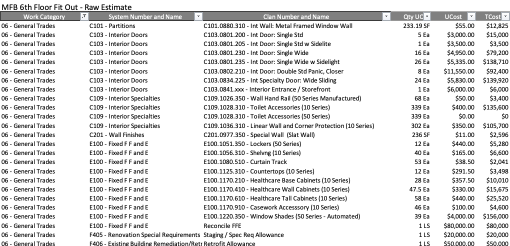
Figure 9 – General Trades Estimate – Uniformat Level 3.5
The intention for the pilot project was to provide this bid proposal breakdown (without quantities and costs) for all bidders for all trades. Bidders would provide their quantities for each line item, along with the unit costs. The costs would include apportionment of supervision, indirect, overhead and profit. These unit costs would then be placed in a database and adjusted for attribute factors. This would have become the first known operation of compiling pure – trade sourced – actual cost that could be used for calibration and validation in preparation of future cost models and estimates. Ultimately, we’ll eliminate most of the manual 2D take off and 3D data conditioning.
Continued Infrastructure Development
As you can see, for an inpatient fit out, the standards, libraries, templates, data tables, data/tech platform, and content have been substantially developed and proven to be technically successful. This technical “Building the Plant” work as been development as far as practical without the emergence planning and fulfillment leaders to help build the consensus are start expanding to system beyond the pilot focus. As these leaders emerge there is still a significant amount of “Building the Plant” development ahead of us.
Deming taught that knowledge is best acquired outside of the system or organization. Ideally, a few planning and fulfillment leaders will join together to help build out the plant, and spread the investment.